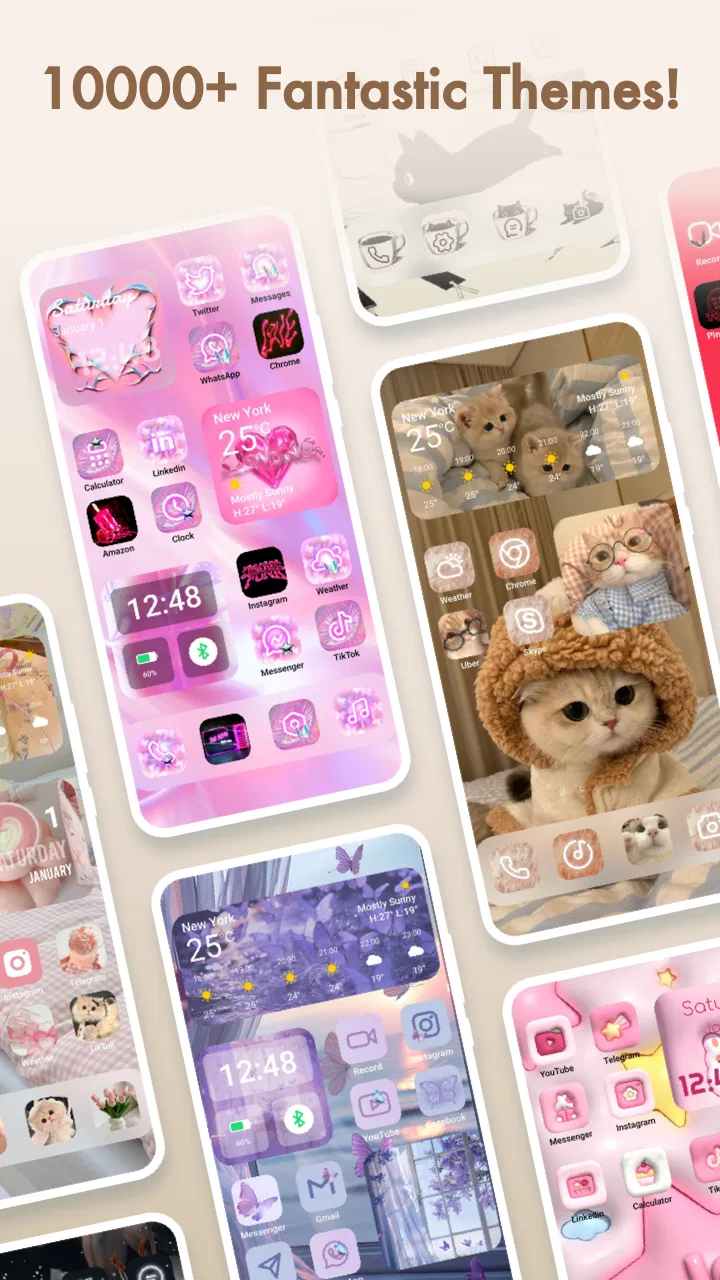
Themepack - App Icons, Widgets
- 4.6
- Rating
- 100.00M
- Installs
- Free
- Price

 Analysis by App-foxy
If you are tired of a phone that looks exactly like everyone else’s, Themepack - App Icons, Widgets gives you a simple way to change its visual mood without replacing the device itself. I approached it as a personalization app rather than a complete phone makeover, and that distinction matters: its appeal is in coordinating the small details that make a home screen feel more intentional, especially icons, wallpapers, and widgets.
In my experience, the best reason to try it is convenience. Instead of hunting through separate wallpaper galleries, icon resources, and widget tools, you can begin with one themed direction and decide how much of it you actually want to use. That makes it approachable for someone who wants a refreshed home screen but does not want to learn a complicated launcher or spend an evening building every element from scratch.
Themepack - App Icons, Widgets is a free personalization app from YoloTech, with optional in-app purchases ranging from $0.99 to $39.99 per item. It is rated Teen, works from Android 7.0 onward, and its current version is 1.0.0.3663. Those details make it accessible to a wide range of Android users, although the optional purchases are important to keep in mind before you become invested in a particular visual style.
You May Also Like

 Pandora - Music & Podcasts
Pandora’s Music Is Easy to Start, but Harder to Recover
Pandora’s strength is its low-effort path from a seed to a station. Its weak spot is how much confidence it asks you to place in connection, setup, and quiet recovery.

 AccuWeather: Weather Radar
AccuWeather Review: A Quick, Clear Forecast for Everyday Decisions
For everyday plans, the best forecast is the one you can understand quickly. AccuWeather makes rain timing, radar, and local conditions easy to act on, with a few trade-offs.

 Hill Climb Racing
Why Hill Climb Racing Still Turns Crashes Into One More Run
A tiny car, a bumpy hill and one more upgrade: Hill Climb Racing keeps resurfacing because its simple chaos makes every near-miss feel personal.

 AliExpress - Shopping App
AliExpress Makes Global Shopping Feel Personal, but Shoppers Bear the Risk
AliExpress turns a global marketplace into a pocket-sized discovery engine. Its reach is useful, its shopping loop compelling, and its trade-offs easy to miss.

 Lords Mobile: Kingdom Wars
Lords Mobile Is a Kingdom-Building Routine, Not a Quick Match
A case-by-case verdict on the building, battles, device demands, and social commitments that make Lords Mobile rewarding for some players and exhausting for others.

 PDF Scanner app - TapScanner
TapScanner Makes Paperwork Easier to Capture, Check, and Share
TapScanner makes scanning with a phone feel less like a rescue operation and more like a dependable step in getting work done. Its capture tools are useful, though not flawless.
More From Our News Desk
View All News


What to consider before changing your home screen
I’d treat a home-screen change as a small routine adjustment, not just a visual choice: the layout you enjoy browsing should still make your most-used apps easy to reach when you’re distracted or in a hurry. Before experimenting, I’d note which shortcuts I rely on and decide how much rearranging I’m willing to maintain; that makes it easier to judge whether the new look is genuinely comfortable.
Start with the kind of change you actually want
Before installing any theme app, I think about whether I want a quick visual refresh or a full redesign. If you only want a new background, a dedicated wallpaper app may be the cleaner choice. If you want complete control over icon shapes, spacing, widgets, and launcher behavior, a custom launcher can offer more flexibility. Themepack sits between those two approaches: it is more coordinated than choosing a random wallpaper, but less demanding than constructing a home screen entirely by hand.
That middle position is its strongest decision-making point. You can use it when your current layout works well but feels dull. You can also use it when you want a seasonal look, a softer color palette, a darker appearance, or a more decorative setup without changing how you navigate every day. I would not choose it solely because I need advanced productivity features; its purpose is visual organization and phone decoration.
Think about consistency, not just individual images
A common mistake with home-screen customization is choosing attractive pieces that do not belong together. One icon pack may be colorful, the wallpaper may be highly detailed, and a widget may use a completely different style. The result can feel busier rather than better. Themepack is useful because it encourages a unified choice. When the icons, background, and widget treatment share a visual direction, even a modest change can make the phone feel deliberately arranged.
I recommend judging a theme with your actual apps in mind. A design can look impressive in a preview and still become awkward when your most-used applications are placed around it. Check whether the visual treatment leaves enough contrast for labels and important shortcuts. A beautiful background is not helpful if it makes the screen harder to scan when you are in a hurry.
Remember that your phone’s system still matters
The app runs on Android, but the final appearance is also influenced by the phone’s own software. Home-screen behavior, icon placement, widget handling, and the way changes are applied can vary between devices. I would therefore treat the app as a design layer rather than assuming it will replace every part of the existing interface. That expectation prevents disappointment and makes the setup process easier to evaluate.
Android 7.0 support is a practical advantage for people using older phones, but an older operating system or heavily customized manufacturer interface may not behave exactly like a newer device. If you use a work phone with strict restrictions or a launcher that you are not allowed to change, check the setup experience before planning a complete redesign.
Where the app is most convincing
The strongest part of Themepack is the way it brings several personalization elements into one decision. I like that approach for people who do not naturally think in terms of typography, color balance, or interface composition. You can begin with a visual idea instead of building a system from separate tools, then keep only the pieces that suit your habits.
Its value also appears when you want a change that feels noticeable but remains reversible. A new wallpaper alone can make a phone look different, yet the effect often disappears once you stop noticing the image. Coordinating the wallpaper with icons and a widget gives the redesign more presence. If you later prefer your original arrangement, the cost of returning to it is mainly time and preference rather than learning an entirely new operating method.
Another advantage is that it can help a disorganized home screen look more intentional without requiring you to delete everything. I found the most sensible workflow is to begin with the first screen, keep the applications you use daily, and avoid trying to redesign every page at once. This makes it easier to notice whether the theme improves navigation or merely adds decoration.
A useful everyday scenario
Imagine that you rely on your phone for messages, maps, music, banking, and work communication. The apps are already in sensible positions, but the screen feels visually noisy after years of small changes. Rather than moving every shortcut and installing a new launcher, you could use Themepack to choose a coordinated background, refresh the icon appearance, and add a widget that gives the first screen a clearer focal point.
In that situation, I would make the first screen functional and leave decorative experiments for a second page. Keep communication and travel tools where your fingers already expect them. Put less urgent shortcuts elsewhere. This is a small but important trade-off: personalization works best when it supports muscle memory instead of forcing you to admire the design while searching for a basic app.
Creation is more valuable when you use restraint
The store summary highlights creation, and that makes the app more interesting than a passive gallery. The useful question is not how many visual changes you can make, but whether you can combine them into a setup that still feels comfortable. I would experiment with one major change at a time: first the background, then the icon treatment, then a widget. That sequence makes it clear which element improves the experience and which one creates clutter.
A practical tip is to compare the home screen at different times of day. A design that feels calm in bright light may become difficult to read at night, while a dark style can make small labels disappear on some screens. I also suggest checking the screen after opening several frequently used apps. If the themed home screen feels attractive but makes you hesitate before tapping, it is not a successful redesign for your routine.
Where another type of app may fit better
Themepack is not automatically the best answer for every personalization goal. A wallpaper-only app is better if you want to change backgrounds frequently and do not care about matching icons or widgets. A launcher is usually the better direction for someone who wants gesture controls, extensive grid adjustments, app-drawer changes, or a completely different navigation structure. Those alternatives may require more setup, but they can give experienced users finer control.
There is also a case for staying with the phone’s default tools. If your current interface is fast, readable, and already organized, a theme may add visual interest without solving an actual problem. I would skip this app if you dislike adjusting icons, widgets, or layouts, or if you tend to abandon customization after a day. Personalization is enjoyable only when the result remains useful after the novelty fades.
People who need a highly consistent work environment should be cautious as well. A decorative design may not suit a phone that must remain visually neutral for professional use. Likewise, users who depend on a very specific launcher arrangement may prefer a tool designed around deep control rather than a theme-centered experience. The right choice depends less on how attractive a preview looks and more on how much control you expect to keep.
Free to begin, but watch the purchase path
The app is free to download, which makes it easy to test without committing money at the start. That is helpful because visual taste is personal; a theme can seem appealing in a preview and feel wrong once it sits behind your real shortcuts. I recommend spending a little time checking how the chosen style works with your own screen before considering any optional purchase.
The in-app purchase range is broad, from $0.99 to $39.99 per item. I would treat the higher end as a serious buying decision rather than an impulse add-on. Ask yourself whether the design solves a lasting problem, whether you will keep it for more than a short period, and whether a simpler wallpaper or launcher would accomplish the same goal. A free starting point is useful, but it does not make every optional item equally good value.
One overlooked cost is the time involved in switching back. Even when the visual change is easy to try, you may spend time restoring your preferred arrangement, checking widgets, and getting used to the original appearance again. My advice is to note where your most important shortcuts are before experimenting. If you have a particularly efficient layout, capture it mentally or with a personal reference so you can rebuild it without frustration.
How it compares with the usual alternatives
Compared with choosing individual wallpapers, Themepack offers a more complete visual starting point. The advantage is coherence; the disadvantage is that you may receive a style that includes elements you would not have selected separately. Compared with a custom launcher, it is likely to feel less like a new operating environment and more like a cosmetic update. That is good for casual users and limiting for people who want to redesign the entire interaction model.
Compared with creating everything manually, the app reduces the number of decisions you need to make. I see that as its main practical benefit. Manual customization can produce a more personal result, but it also makes mismatched colors, inconsistent icon styles, and unfinished layouts more likely. Themepack is the better fit when you value a quick, coordinated result over absolute control.
The trade-off is that convenience can narrow your creative range. If you already know exactly how you want your home screen to look, you may find a theme-based workflow restrictive. If you only know that your phone feels tired and you want a fresh direction, the guided approach is much more useful.
Small habits that improve the result
Begin with the screen you use most rather than changing every page immediately.
Keep text-heavy or frequently used shortcuts against a calm background so they remain easy to recognize.
Use one prominent widget as an anchor instead of filling the screen with decorative elements.
Test the design with your normal brightness and notification habits, not only while browsing themes.
Before buying an optional item, decide whether it improves navigation or only adds a temporary novelty.
These steps sound simple, but they address the main weakness of personalization apps: it is easy to collect attractive pieces and difficult to create a screen that remains comfortable. The best result is usually not the most elaborate one. It is the setup that lets you find your important apps quickly while giving the phone a look you enjoy seeing every day.
What the audience and adoption suggest
The app has a 4.7 average from around 1.2 million ratings, with more than 50 million installs. That level of adoption suggests that the basic idea is easy for many Android users to understand, and it gives the app a substantial user base compared with a little-known customization tool. I still would not treat popularity as proof that every theme will suit your device or taste; personalization is too subjective for that.
The Teen content rating is also worth noticing if the phone is shared with younger users. It places the app in a category that deserves ordinary parental awareness rather than being treated as a tool for very young children. For most adults, the more relevant questions will be visual preference, device compatibility, and whether optional purchases fit their budget.
My recommendation after weighing the trade-offs
I recommend Themepack to Android users who want a coordinated home-screen refresh and prefer guided decoration over technical customization. It is especially suitable if you like matching icons, wallpapers, and widgets but do not want to assemble those pieces through several unrelated apps. The free entry point makes it reasonable to try, provided you review optional purchases carefully and judge the result on your own phone.
I would choose a different route if your priority is deep launcher control, advanced gestures, a highly specific grid, or a strictly functional interface with no decorative layer. In those cases, the extra flexibility of a dedicated launcher or the simplicity of the default system may serve you better. Themepack is at its best as a middle-ground tool: more expressive than a wallpaper change, less demanding than a complete interface rebuild.
For my own decision, the key question is whether I want my phone to feel coordinated without becoming a project. If the answer is yes, this app is worth exploring. I would start with one free-looking setup, preserve the shortcuts I already use, and live with the design for several days before spending anything. The best reason to install it is not the promise of endless decoration, but the chance to make an everyday screen feel more personal without giving up familiar Android habits.
FAQs for Themepack - App Icons, Widgets
01What is Themepack and what features does it offer?
Themepack is an app that allows users to customize their device's appearance by providing a variety of app icons, widgets, and themes. With its extensive library, you can choose from a wide range of designs to personalize your home screen, making your device truly unique and visually appealing.
02Is Themepack compatible with both Android and iOS devices?
Yes, Themepack is designed to work seamlessly on both Android and iOS devices. The app provides platform-specific features to ensure optimal performance and customization options, allowing users across both operating systems to enjoy personalizing their device's aesthetic.
03Does Themepack require any special permissions to function properly?
To provide a comprehensive customization experience, Themepack may request permissions to access certain parts of your device, such as the home screen and widget settings. These permissions are strictly for app functionality and to ensure that icons and widgets can be applied correctly.
04Are there any costs associated with using Themepack?
Themepack offers both free and premium options. While you can access a selection of free themes and icons, a premium subscription unlocks additional exclusive content and features. This subscription model allows users to enhance their customization experience with more variety and advanced options.
05How frequently is new content added to Themepack?
Themepack regularly updates its library with new themes, icons, and widgets to keep your customization options fresh and exciting. Users can expect updates that coincide with seasonal changes, holidays, and popular trends, ensuring there's always something new to explore.
Pros
- Customizable themes enhance personalization.
- Wide variety of icons and widgets.
- User-friendly interface for easy navigation.
- Regular updates with new content.
- Supports both Android and iOS platforms.
Cons
- Some themes require in-app purchases.
- Occasional glitches during setup.
- Limited free icon packs available.
- Resource-intensive on older devices.
- Requires constant internet connection.

Themepack - App Icons, Widgets
Gallery